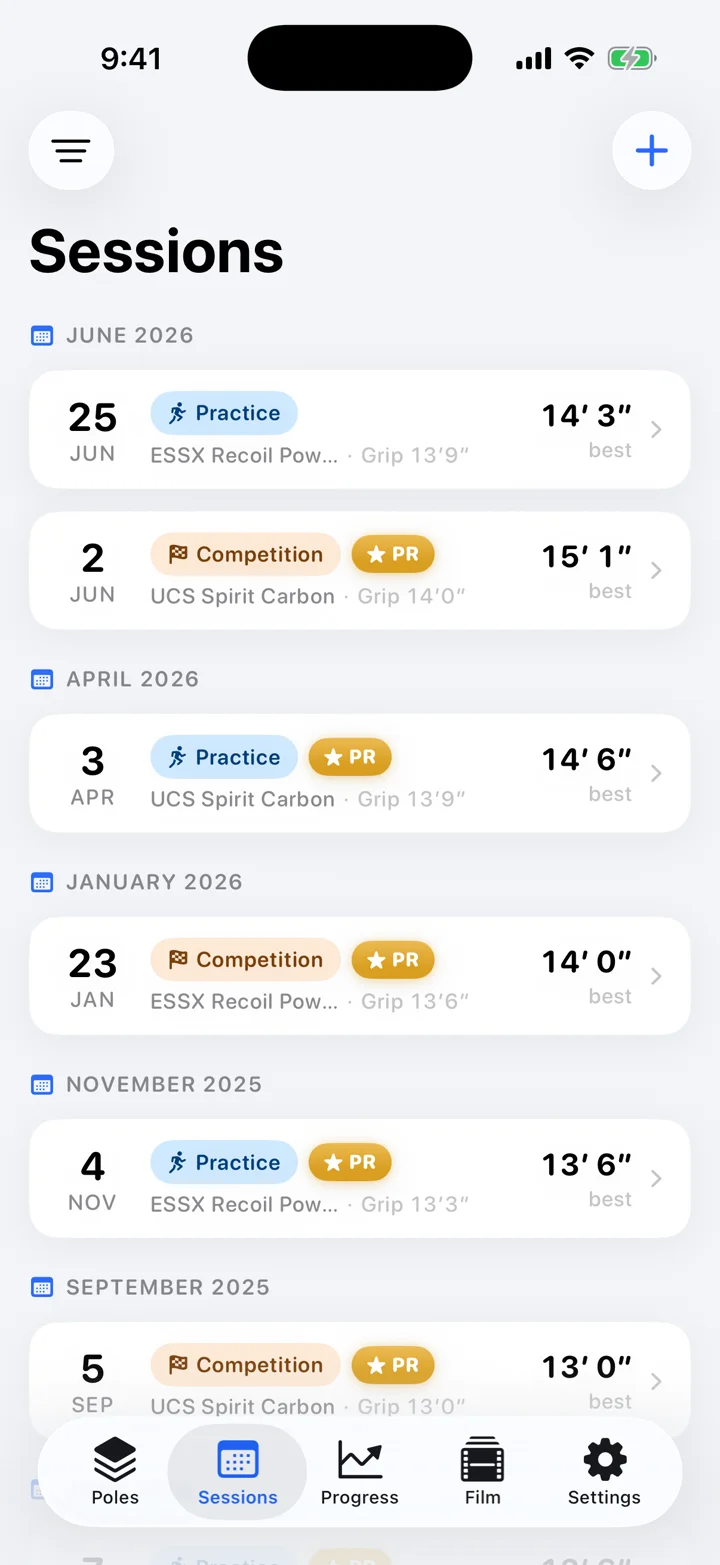
Most days are not the meet run. Log the day you actually took to the pit.
Small Drill-only. 1–3 lefts. Pole runs, plant drills, sliding box, towel plants, straight pole, rollovers, pop-ups, swing, rope, gymnastics.
Medium Short approach — often one left shorter than the meet run, so the jumps stay quality.
Big Longer run, still usually not the full competition approach. Warm it like the weight room: easier grip, softer pole, shorter step, then work up.
The budget Fulls are rationed. Mid mark. On, under, or out. One cue, not sixteen. A bungee make is not a PR.
Meet day
Most of it is waiting. Then one minute.
Opening height is a choice. The card is O / X / —. Pass is one-way. NH is NH.
Opening height A decision. Pass before they call you — pass is one-way. After three passes you may get a no-bar warmup at a height change.
Three misses Three attempts a height. Three consecutive misses, rolling across any heights, and you are out. NH is NH.
Five-alive Until the field thins, then one flight. On hold. Then the one-minute clock.
Between attempts Standards and pole can change. Don't burn legs on a bar you should have skipped.
On this phone
Jumps and film stay on this phone.
No account. Nothing uploaded. The card and the film never leave the device.
No accountOpen it. Log the jump. That's the whole onboarding.
Nothing uploadedJumps and film live on the iPhone. Nothing is mirrored or backed up to a server.
No trackingZero analytics, zero third-party SDKs, zero data collection.
No photo permissionThe system photo picker runs out-of-process — the app never sees your library.
One honest exception: the weather
Start a session and the app takes one location fix to recognize the runway and pull wind and temperature from Apple Weather. That coordinate goes to Apple and nowhere else — decline it and the app never touches the network.
Poles. Practice. Meets. Film. The numbers.
Five places the week actually lives.
Poles
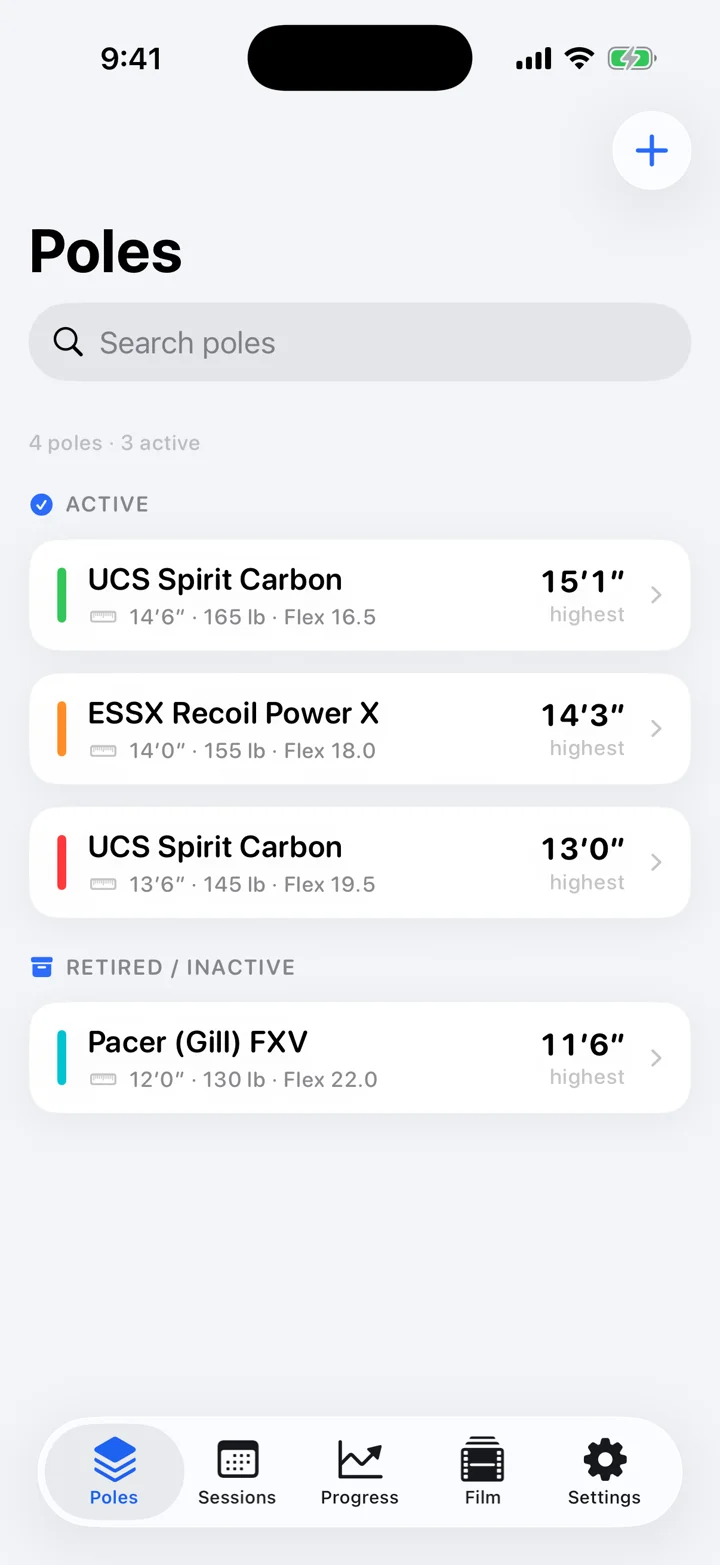
The quiver — length, weight, flex, grip, and the highest real bar on each pole.
Sessions
Small, medium, or big — Quick Log between jumps, one cue, drills, fulls as a budget.
Meet Mode
Opening height, pass, the one-minute clock, and the O·XO·XXO card.
Film Room
Plant, takeoff, swing, invert — frame by frame, next to the PR jump.
Progress
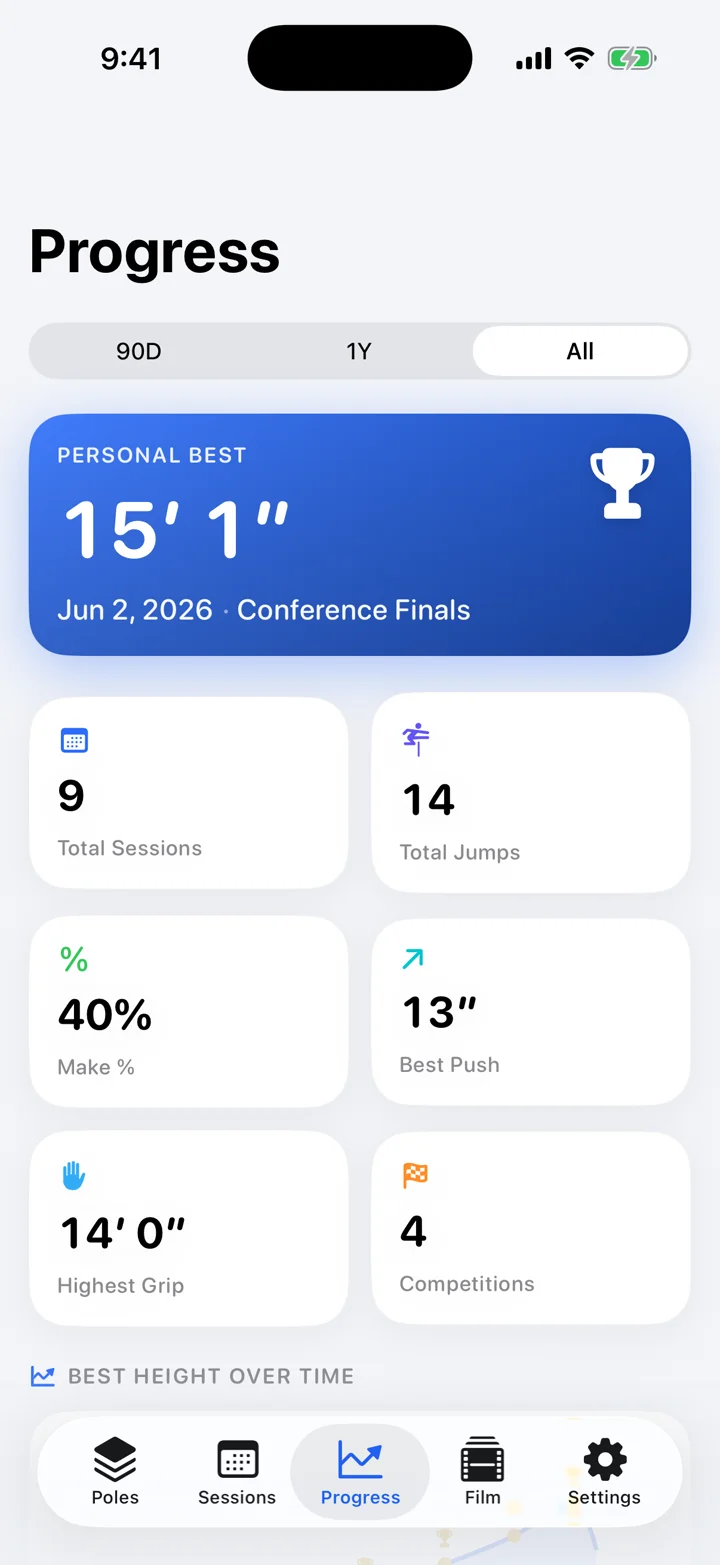
Real-bar PRs only. Make rate. The career pole ladder. On-device insights.
The Vaulter's Numbers
It speaks vaulter.
Standards, takeoff, marks, lefts. The jump as it's actually called — every setup a coach would ask about.
Standards, 5 cm
Eight inline chips — the universal 5 cm calls, even at US high-school meets. No sheets, no inch presets.
4550556065707580cm
On, under, or out
Takeoff as it's shouted from the standards — with the offset in inches.
OUT
UNDER 4″
ON
Start and mid
Start mark, mid mark, and whether you hit the mid.
92′6″Start57′0″MidHitCheck
Lefts and steps
Both conventions, on the same jump. Automatically.
12 stepsCount6 leftsCalled
Bar or bungee
What was actually up. A bungee make is practice. Only a real bar is a PR.
BarBungee
Why the miss?
Twelve miss tags — late plant, under, out, stalled, rejected, no inversion. One tap, then the season pattern.
Late plantUnder at takeoffOut at takeoffLow carryPunched the poleFlagged outStalled outBlew throughGot rejectedNo inversionBar going upBar coming down
New jumps prefill from your last one. Same as last, change one thing — because that's how practice works.
Quick Log
Between jumps. One tap.
The pit doesn't wait for a form.
Make. Miss. Done.
Bar height with −3″/+3″ chips, a bar/bungee flip, MAKE and MISS, and a slim run-through — logged before the next call.
Setup carries forward
Pole, grip, standards, start and mid. Change one thing. Log the jump.
Undo, always
A persistent undo line and a jump counter keep the book honest, even between turns.
One screen, not sixteen cues
Date, pole, grip, approach, today's cue. Everything else waits in More Details, prefilled from last time.
New in 1.4 · The session, coached
What kind of day was it?
The runway you're on, the one cue, the drills, and how many fulls you've spent this week.
The runway remembers
One quiet location fix when you start recognizes the track and recalls last time's start, mid, steps, pole, grip, and standards — one tap applies it.
Temperature, wind, gusts, and direction from Apple Weather — override or clear it.
68°9 mph NWgusts 14
One cue, pinned
Coaches pick two or three. Pin one cue to the Lock Screen — MAKE / MISS, no unlock.
Hard hands at the plant
Drill days count
Tap the real blocks — pole runs, plants, sliding box, towel plants, straight pole, rollovers, pop-ups, swing, rope, gymnastics — plus a volume note like "3×20 m." A small day still belongs in the week.
Pole runsPlant drillsSliding boxTowel plantsStraight poleRolloversPop-upsSwing drillsRope workGymnasticsSprintsLifting
Full approach is a budget
This week's full-run jumps against your cap, days since the last full-run day, and an eight-week stack of full approach against short. The pit session dies if you just jump more.
10 / 24 this week7 days since full-run · recovered
Full approachShort approach
Meet Mode
Opening height. Then the clock.
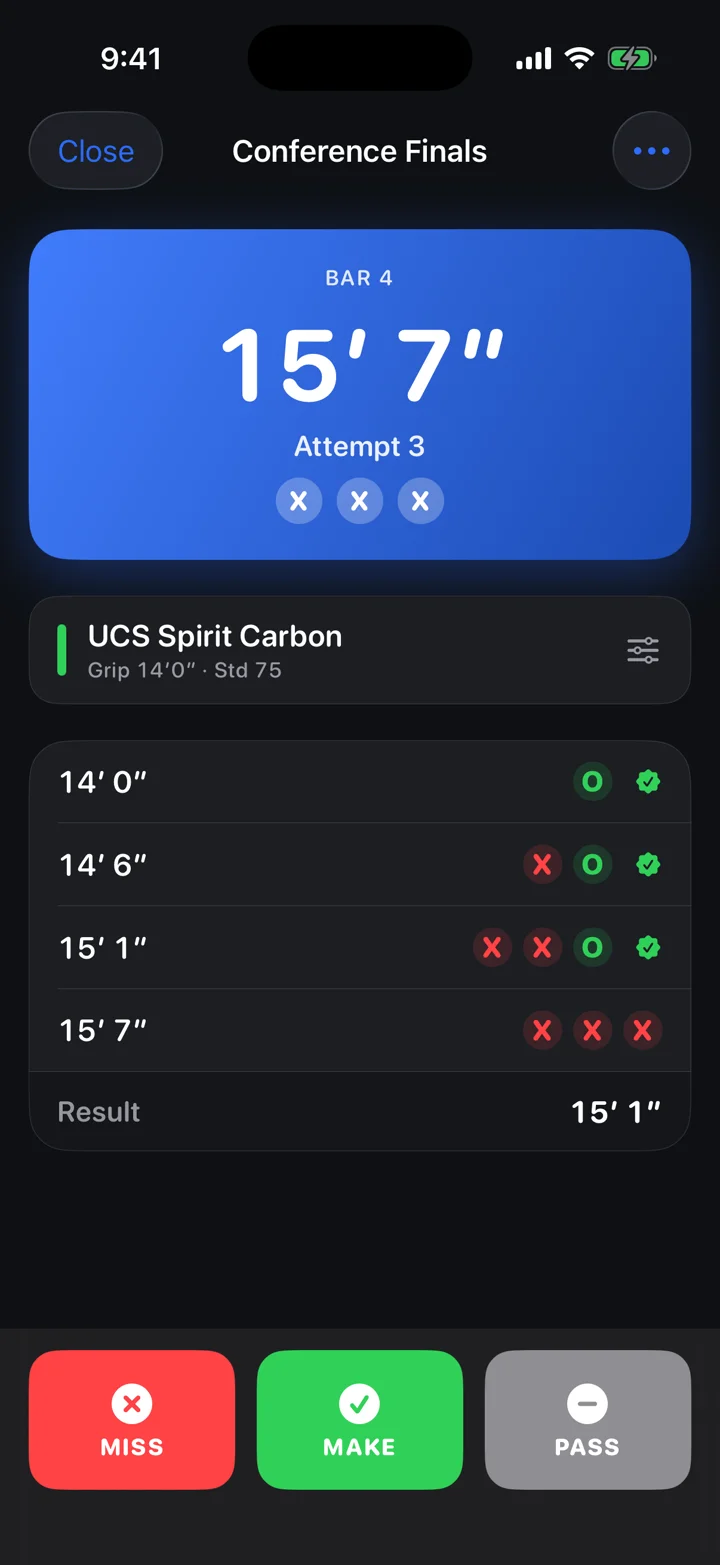
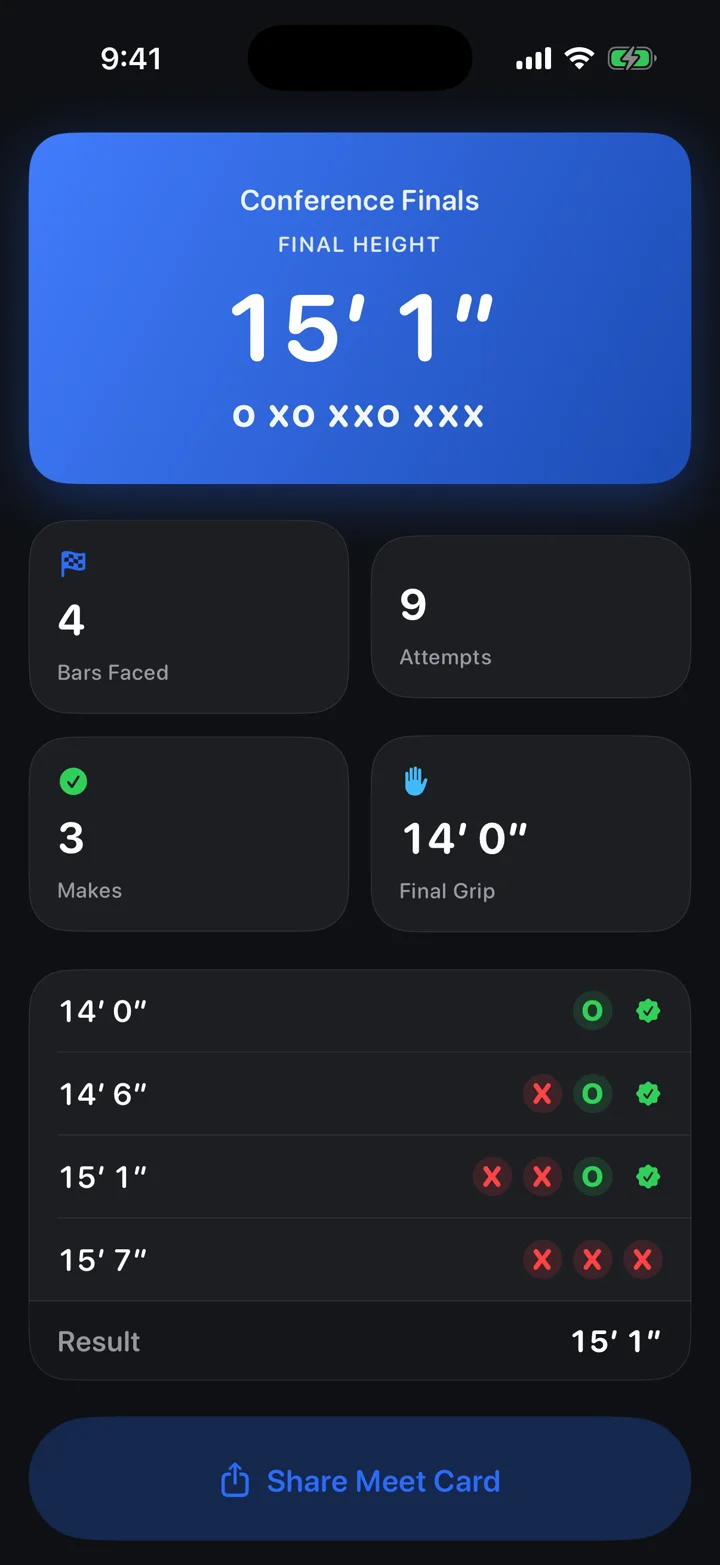
Five-alive. On hold. One minute. O · XO · XXO. Three misses and you're out.
14′0″
O
14′6″
XO
15′1″
XXO
PR
15′7″
XXX
The card: O · XO · XXO — then out. A PR only if it's a real bar.
The live board: MAKE, MISS, PASS — sized for one minute.
The meet card: the ladder you actually jumped.
On your Lock Screen
A Live Activity puts the current bar, attempt dots, and MAKE / MISS on the Lock Screen and in the Dynamic Island. Log it on hold, without unlocking.
Opening height, pass, three misses
Set the open and the raise. The bar moves. Pass before you're called. Three consecutive misses and you're out — including no-height. Between attempts: pole, grip, standards.
The ladder is already written
Every attempt saves when you log it. Dead battery, killed app — the card is already on the phone.
Film Room
Plant. Takeoff. Swing. Invert.
Every clip on the jump, with the bar and the result. Then step through the plant.
TODAY · 14′3″f 142 · 2.37s
PR · 15′1″f 142 · 2.37s
0.1×0.25×0.5×1×
frame 142 / 229 · 2.37 s
Frame by frame
Step through the plant one frame at a time. Scrub it. Read time and frame. Slow motion from 0.1× to 1×.
Draw on the jump
A pen and an angle line, on the video — plant angle, takeoff position, the number right there.
This jump vs. the PR jump
Two clips, one transport, nudge them onto the same frame. Watch the difference, not your memory of it.
Film with the bar on it
Filter by media, pole, or makes only. Every cell shows the bar and the result.
Progress
A PR is a bar you cleared.
Bungee doesn't count. A miss at 15 is not a 15. PRs are cleared, not set.
Computed, not claimed
The PR timeline is real-bar makes only. A missed 15′ is not a 15′ PR. You cleared it, or you didn't.
Make rate, by bar
Make % and total jumps, plus a make-rate-by-bar chart — where attempts actually go to die.
The career pole ladder
Every pole you've moved through, in order — the season told in fiberglass and carbon.
Insights, on this phone
Facts from your season, phrased on-device by Apple Intelligence. The prompt never leaves the phone.
15′1″ / 4.60 mPersonal best — computed, not claimed
68%Make rate, this season
90D · 1Y · AllEvery chart, on your timeline
Poles
Length, flex, grip, highest bar.
The quiver is equipment, history, and the weight rule — all three live here.
The full spec
Brand, model, length, weight rating, flex, serial, condition, color. Search it. Active or retired. Identical ESSX poles finally tell apart.
Highest bar, per pole
What you've actually cleared on it, from the sessions — not a note you typed once.
The weight rule, watched
Set body weight once. Any pole rated under it is flagged in the picker and in Meet Mode — the NFHS rule, checked for you.
Pole Vault OS
See you on the runway.
Practice is reps. Meet day is the card. Both stay on this phone.